2. Transient Simulation about Sierra/SM Preload#
Hand-off from Sierra/SM to Sierra/SD uses separate runs. First Sierra/SM writes the necessary data to the output Exodus file. Second Sierra/SD reads the data and executes the analysis. An updated Lagrangian approach is used, in the sense that the nodal coordinates in Sierra/SD are the initial coordinates for Sierra/SM plus the final set of displacements computed in Sierra/SM. For large models splitting the computation into two phases acts like a convenient restart.
The default names of the fields written by Sierra/SM differ from the default names of the same fields read by Sierra/SD. The purpose of Sierra/SD’s receive_sierra_data solution case is to address these inconsistencies.
A linear transient analysis of a preloaded cantilevered beam is described to illustrate how Sierra/SM output is used. The preload deformed the beam, and the initial stress state contributes to alterations in stiffness.
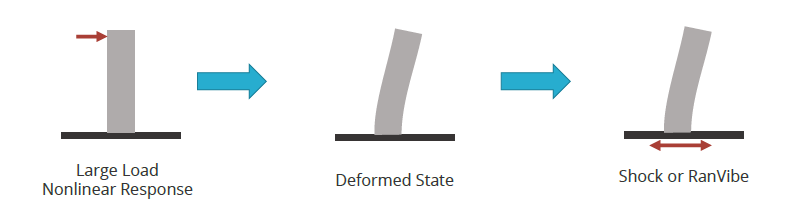
Figure 2.1 Applying Sierra/SD to the output of Sierra/SM: cantilevered beam.#
The content for this section is based on an example and explanatory information provided by Vince Pericoli. All the files used in these simulations are available to members of the Sierra Users group on the CEE SRN at:
unix> cd /projects/sierra/tests/master/tests
unix> ls sd_sm_coupled_rtest/exampleproblemsmanual/sm_sd_handoff
A similar sequence of events, shown in Figure 2.1 could be used to model the shock or vibration response of a body that has undergone substantial perturbations due to preload.
Originally the cantilever beam was statically loaded in Sierra/SM.
unix> sierra adagio -i simple_cantilever_sm.i
The Sierra/SM output syntax was configured to meet the input requirements of Sierra/SD.
Sierra/SM input deck syntax is described in the Sierra/SM documentation, particularly the Output chapter.
When preload deformations are significant in Sierra/SM, for instance, in the case of foam materials under high compression, it is important to consider mass conservation through the transfer, since Sierra/SD computes stiffness and mass matrices in the deformed configuration. Thus, material density must be updated on hand-off to reflect this deformation. As Sierra/SM does not support density output directly, special output options must be included in the Sierra/SM input deck.
Functions are typically defined in the sierra scope of the
Sierra/SM input file.
BEGIN FUNCTION ElementDensity
  type = analytic
  expression variable: m = element element_mass
  expression variable: v = element volume
  evaluate expression = "m/v"
END
Density must then be requested for output from the Sierra/SM analysis, in addition to other required hand-off variables, as follows.
BEGIN USER OUTPUT
  compute element element_density as function ElementDensity
END
Begin results output sd_handoff
  database name = sm_output/sm_to_sd.e
  database Type = exodus
  additional times {end_time}
  nodal variables = displacement as displ
  element variables = stress
  element variables = element_density
  component separator character = none
End
Option additional times is handy for creating an output file
containing only the last time step, and similar tasks. This reduces file
size and also eliminates any ambiguity as to which step provides the
initial state to Sierra/SD. The component separator character = none
command is used with fields such as stress, stress_xx, and
displacement, displ_x, where underscore (_) is the default
separator. Specifying none is optional but recommended.
The Sierra/SM and Sierra/SD material definitions must be nominally
consistent. For this model, Sierra/SM uses an elastic-plastic and
Sierra/SD uses the small strain linearization of the model. This is
achieved by simply matching the youngs modulus and poissons ratio in
Sierra/SM input to the Sierra/SD input, E and nu. One key difference
is, when density is handed off from Sierra/SM, that the material density
must be specified as an Exodus mesh variable in Sierra/SD.
MATERIAL FOAM
  // original density = 26.
  density exo_var scalar element_density
  ...
END
Expanded Sierra/SD support for Lamé materials has required that many of the possible Sierra/SM element fields be read into Sierra/SD, especially the state variables associated with a given Lamé model.
element variables = lame_state_hyperfoam
Adagio output can also include the Polar decomposition of the Total
Lagrange deformation gradient, even if the element itself uses an
Updated Lagrange formulation. The decomposition is stored in the element
fields rotation and left_stretch.
element variables = left_stretch
element variables = rotation
When utilizing a Lamé model, it is also important to note that
Sierra/SD computes a material stiffness that combines material and
geometric stiffness contributions; thus, the no_geom_stiff option
should be exercised when handing off data to Sierra/SD using the
receive_sierra_data solution case.
The SEACAS tool algebra can extract only the final results from any
Sierra/SM output file, given the approximate times of the last two time
steps. Here is an example of how to do this if the final two
Sierra/SM simulation output times are approximately \(1.99\) and \(2.0\).
# create an input file for SD containing only the last step
unix> algebra sm.exo smforsd.exo
algebra> tmin 1.995
algebra> save element
algebra> save nodal
algebra> end
Note also that an algebra session must terminate with end.