10. User Subroutines
User-defined subroutines is a functionality shared by Adagio and Presto. This chapter discusses when and how to use user-defined subroutines. There are examples of user-defined subroutines in the latter part of this chapter. Some of the examples are specific to a given analysis type, i.e., they are applicable to Presto rather than Adagio or vice versa. All examples, regardless of their applicability, do provide important information about how to use the command options available for user-defined subroutines.
In the introductory part of Section 10, we first describe, in general, possible applications for the user subroutine functionality in Sierra/SM. Then, again in general, we describe the various pieces and steps that are required by the user to implement a user subroutine. Subsequently, we focus on various aspects of implementing the user subroutine functionality. Section 10.1 describes the details of the user subroutine. Section 10.2 describes the command lines associated with user subroutines that appear in the Sierra/SM input file. In Section 10.3, we explain how to build and use a version of Sierra/SM that incorporates your user subroutine. Finally, Section 10.4 provides examples of actual user subroutines, and Section 10.5 lists some subroutines that are now in the standard user library.
Applications. User subroutines are primarily intended as complex function evaluators that are to be used in conjunction with an existing Sierra/SM capability (boundary conditions, element death, user output, etc.). Some Examples of possible uses of user subroutines are as follows:
Element death determined by a complex function based on a set of physical parameters and element stress.
Complex time and space history dependency for a displacement boundary condition.
Computation the total contact force acting on a given surface and then use of that force to compute a specialized post processing output.
Transformation of element stress to a arbitrary user defined local coordinate system.
Computation of cavity volume of an enclosed sideset.
Aerodynamic pressure based on velocity and surface normal applied to a specified surface.
Some capability exists for using mesh connectivity. It is possible to compute an element quantity based on values at the element nodes.
Some difficulties might occur in parallel applications. If computations for element A depend on quantities in element B and elements A and B are on different processors, then the computations for A may not have access to quantities in element B. For most computations in user subroutines, however, this should not be a problem.
Implementing completely new capabilities, particularly if these capabilities involve parallel computing, may be difficult or impossible with user subroutines.
General Pieces and Steps. A number of pieces and steps are required to make use of user subroutines. Here, we present a brief description of the pieces and steps that a user will need for user subroutines without going into detail. The details are discussed in later parts of this chapter.
You must first determine whether your application fits in the user subroutine format. This can be done by considering the above requirements and examining the description of commands for functionality in Sierra/SM. For example, the basic kinematic boundary conditions and force conditions allow for the use of user subroutines. The description of these commands includes a discussion of how a user subroutine could be applied and what command line will invoke a user subroutine.
If you determine that your application can make use of the user subroutine functionality in Sierra/SM, you will then need to write the subroutine. The parts of the subroutine that interface to Sierra/SM have specified formats. The details of these interfaces are described in later sections. One part of the subroutine with a specified format is the call list. Other parts of the subroutine with a specified format are code that will do the following:
Read parameters from the Sierra/SM input file.
Access a variety of information—field variables, analysis time, etc.—from Sierra/SM.
Store computed quantities.
Parameters are values they may be passed from the Sierra/SM input file to the user subroutine. Suppose that the spatial variation for some quantity in the user subroutine uses some characteristic length and the user wishes to examine results generated by using several different values of the characteristic length. By setting up the characteristic length as a parameter, the value for the parameter in the user subroutine can easily be changed by changing the value for the parameter in the input file. This lets the user change the value for a variable inside the user subroutine without having to recompile the user subroutine.
The portion of your subroutine not built on the Sierra/SM specifications will reflect your specific application. The code to implement your application may include a loop over nodes that prescribes a displacement based on the current time for the analysis and the spatial location of the node.
After you write the user subroutine, you will need to have a command line in your input file that tells Sierra/SM you want to use the user subroutine you have written. For example, if your user subroutine is a specialized prescribed displacement boundary condition, then inside a cmd{PRESCRIBED DISPLACEMENT} command block, you will have a command line of the form
NODE SET SUBROUTINE = <string>subroutine_name
that provides the name of your user subroutine.
Following the invocation of the user subroutine, there may be command lines for various parameters associated with the user subroutine. There may also be some additional command lines in other sections of the code required for your application. For example, you may have to add command lines in the region scope that will create an internal variable associated with a computed quantity so that the computed quantity can be written to the results file.
Once you have constructed the user subroutine, which is a FORTRAN file, and the Sierra/SM input file, you can build an executable version of Sierra/SM that will run your user subroutine. Your Sierra/SM run will then incorporate the functionality you have created in your user subroutine.
Fig. 10.1 presents a high-level overview of the various components that work together to implement the user subroutine functionality. The two main components needed for user subroutines, which are commands in the Sierra/SM input file and the actual user subroutine, are represented by the two columns in Fig. 10.1.
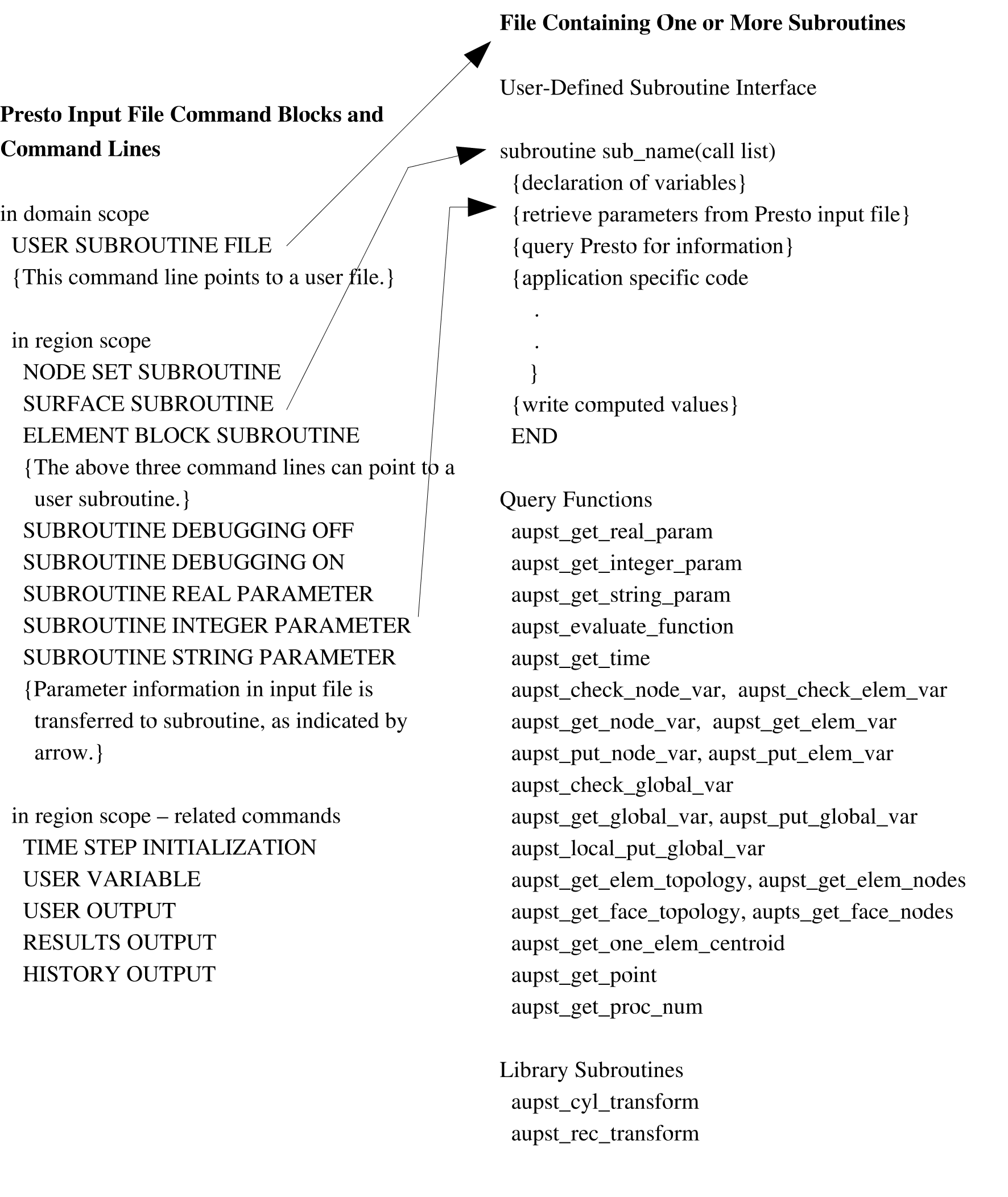
Fig. 10.1 Overview of components required to implement user subroutine functionality, excluding compilation and execution commands.