1.8. Input/Output Files
The primary user input to Sierra/SM is the input file introduced in this chapter. Throughout this document, we explain how to construct a valid input file. Be aware that Sierra/SM also processes many other types of input files and produces a variety of output files. These additional files are also discussed in this document where applicable. Fig. 1.1 shows a simple schematic diagram of the various input and output files.
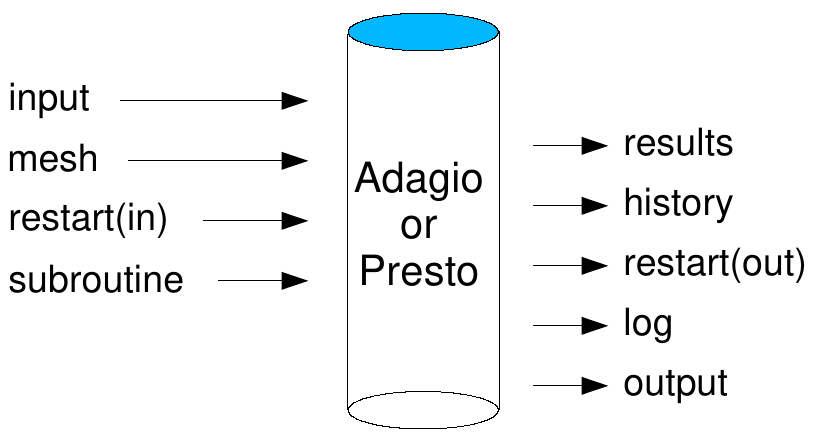
Fig. 1.1 Input/output files
As shown in Fig. 1.1, Sierra/SM uses the input file, mesh files, restart files, and user subroutine files. The input file, which is required, is a set of valid Sierra/SM command lines. Another required input is a mesh file, which provides a description of the finite element mesh for the object being analyzed. Restart and user subroutine files are optional inputs. The restart functionality lets you break an analysis from the start time to the termination time into a sequence of runs. The files generated by the restart functionality contain a complete state description for a problem at various analysis times, which we will refer to as restart times. You can restart Sierra/SM at any of these restart times because the complete state description is known (see Section 9). The user subroutine files let you build and incorporate specialized functionality into Sierra/SM (Section 10.2). As also shown in Fig. 1.1, Sierra/SM can generate a number of files. These include results files, history files, restart files, a log file, and an output file. Typically, only the log file and the output file are produced automatically. Generation of the other types of files is based on user settings in the input file for the particular output desired. Results files provide the values of global variables, element variables, and node variables at specified times (see Section 9). History files will also provide values of global variables, element variables, and node variables at specified times (see Section 9). History files are set up to provide a specific value at a specific node, for example, whereas results files provide a nodal value for large subsets of nodes or, more typically, all nodes. History files provide a more limited set of information than results files. As noted above, restart files can be generated at various analysis times. The log file contains a variety of information such as the Sierra/SM version number, a listing of the input file, initialization information, some model information (mass, critical time steps for element blocks, etc.), and information at various time steps. At every \(n\)th step, where \(n\) is user selected, the log file gives the current analysis time; the current time step; the kinetic, internal, and external energies; the error in the energy; and computing time information. You can monitor step information in the log file to gain information about how your analysis is progressing. The output file contains error information.