9.10. Variable Interpolation
The variable interpolation command block is used to transfer data from one block or surface to another. Generally the transferred data is output data that will be used for a subsequent analysis. As an example the variable interpolation command block was created primarily to aid acoustic analysis where the derivative of void element volume is mapped from the structural Sierra/SM mesh to a background acoustic mesh for use in Salinas.
BEGIN VARIABLE INTERPOLATION [<string>var_interp_name]
  TRANSFER TYPE = INTERPOLATE FROM NEAREST FACE|
    SUM TO NEAREST ELEMENT
  SOURCE VARIABLE = ELEMENT|NODAL|
    SURFACE NORMAL NODAL <string>source_var_name
  SOURCE ELEMENT BLOCK = <string>source_block
  SOURCE ASSEMBLY BLOCK = <string>source_assembly
  SOURCE SURFACE = <string>source_surface
  SOURCE ASSEMBLY SURFACE = <string>source_assembly
  TARGET VARIABLE = ELEMENT|FACE|NODAL
    <string>target_var_name
  TARGET DERIVATIVE VARIABLE = ELEMENT|FACE|NODAL
    <string>target_deriv_var_name
  TARGET SURFACE = <string>target_surface
  TARGET ASSEMBLY SURFACE = <string>target_assembly
  SEARCH TOLERANCE = <real>search_tol
  PROXIMITY SEARCH TYPE = RAY SEARCH|SPHERE SEARCH
  RAY SEARCH DIRECTION = <real>vecx <real>vecy <real>vecz
  ONE WAY RAY SEARCH DIRECTION = <real>vecx <real>vecy <real>vecz
  RAY SEARCH DIRECTION = ORTHOGONAL TO LINE <real>p1x
    <real>p1y <real>p1z <real>p2x <real>p2y <real>p2z
  RAY SEARCH DIRECTION = TARGET SURFACE NORMAL

  ACTIVE PERIODS = <string list>period_names
  INACTIVE PERIODS = <string list>period_names
END [VARIABLE INTERPOLATION <string>var_interp_name]
The command TRANSFER TYPE can be set to either INTERPOLATE FROM NEAREST FACE or SUM TO NEAREST ELEMENT. The TRANSFER TYPE restricts the commands that can be used in conjunction with it.
When TRANSFER TYPE is set to INTERPOLATE FROM NEAREST FACE the available commands are restricted to:
BEGIN VARIABLE INTERPOLATION [<string>var_interp_name]
  TRANSFER TYPE = INTERPOLATE FROM NEAREST FACE
  SOURCE VARIABLE = NODAL|SURFACE NORMAL NODAL
    <string>source_var_name
  SOURCE SURFACE = <string>source_surface
  SOURCE ASSEMBLY SURFACE = <string>source_assembly
  TARGET VARIABLE = NODAL <string>target_var_name
  TARGET DERIVATIVE VARIABLE = NODAL <string>target_deriv_var_name
  TARGET SURFACE = <string>target_surface
  TARGET ASSEMBLY SURFACE = <string>target_assembly
  SEARCH TOLERANCE = <real>search_tol
  PROXIMITY SEARCH TYPE = RAY SEARCH|SPHERE SEARCH
  RAY SEARCH DIRECTION = <real>vecx <real>vecy <real>vecz
  ONE WAY RAY SEARCH DIRECTION = <real>vecx <real>vecy <real>vecz
  RAY SEARCH DIRECTION = ORTHOGONAL TO LINE <real>p1x
    <real>p1y <real>p1z <real>p2x <real>p2y <real>p2z
  RAY SEARCH DIRECTION = TARGET SURFACE NORMAL
END [VARIABLE INTERPOLATION <string>var_interp_name]
For TRANSFER TYPE = INTERPOLATE FROM NEAREST FACE, a given point on the target surface is mapped to the closest point on the source surface. At that closet source point the source variable is interpolated. The interpolated value is then copied from the interpolated source point to the target point. Optionally if the SURFACE NORMAL NODAL command is being used and the variable being transferred is a vector then only the surface normal component of that variable will be transferred. This is useful for several applications involving transferring solid mesh quantities such as velocity to a reference mesh modeling a fluid (e.g., air). In such applications only the surface normal vibration is relevant to the air acoustic solve.
When TRANSFER TYPE is set to SUM TO NEAREST ELEMENT the available commands are restricted to:
BEGIN VARIABLE INTERPOLATION [<string>var_interp_name]
  TRANSFER TYPE = SUM TO NEAREST ELEMENT
  SOURCE VARIABLE = ELEMENT <string>source_var_name
  SOURCE ELEMENT BLOCK = <string>source_block
  SOURCE ASSEMBLY BLOCK = <string>source_assembly
  TARGET VARIABLE = ELEMENT <string>target_var_name
  TARGET DERIVATIVE VARIABLE = ELEMENT
    <string>target_deriv_var_name
  TARGET SURFACE = <string>target_surface
  TARGET ASSEMBLY SURFACE = <string>target_assembly
  SEARCH TOLERANCE = <real>search_tol
  PROXIMITY SEARCH TYPE = RAY SEARCH|SPHERE SEARCH
  RAY SEARCH DIRECTION = <real>vecx <real>vecy <real>vecz
  ONE WAY RAY SEARCH DIRECTION = <real>vecx <real>vecy <real>vecz
  RAY SEARCH DIRECTION = ORTHOGONAL TO LINE <real>p1x
    <real>p1y <real>p1z <real>p2x <real>p2y <real>p2z
END [VARIABLE INTERPOLATION <string>var_interp_name]
For TRANSFER TYPE = SUM TO NEAREST ELEMENT, a given element in the source block computes its centroid. Then the closest face to that centroid on the target surface is found. The source element value is summed to the element attached to that target face.
The command SOURCE VARIABLE specifies the variable type, ELEMENT, GLOBAL, or NODAL, and the name of the source variable source_var_name.
The command SOURCE ASSEMBLY BLOCK specifies the name of the source assembly of blocks source_assembly.
The command SOURCE SURFACE specifies the name of the source side set source_surface.
The command SOURCE ASSEMBLY SURFACE specifies the name of the source assembly of side sets source_assembly.
The command TARGET VARIABLE specifies the variable type, ELEMENT, FACE, or NODAL, and the name of the target variable target_var_name. The target variable must exist. If necessary, a target variable can be created using the BEGIN USER VARIABLE command block (Section 10.2.4).
The command TARGET DERIVATIVE VARIABLE can be used to optionally compute the time derivative of the target variable. This command specifies the type of variable, ELEMENT, FACE, or NODAL, and the name of the variable to store the derivative, target_deriv_var_name. The target derivative variable must exist. If necessary, a target variable can be created using the BEGIN USER VARIABLE command block (Section 10.2.4).
The command TARGET SURFACE specifies the name of the target side set target_surface.
The command TARGET ASSEMBLY SURFACE specifies the name of the target assembly of side sets target_assembly.
The command SEARCH TOLERANCE specifies a search distance for use in the proximity search.
The command PROXIMITY SEARCH TYPE can be set to either RAY SEARCH or SPHERE SEARCH. When PROXIMITY SEARCH TYPE = SPHERE SEARCH the SEARCH TOLERANCE is used as the radius for closest point searches. When PROXIMITY SEARCH TYPE = RAY SEARCH the SEARCH TOLERANCE and any RAY SEARCH DIRECTION are used together to form rays with lengths equal to the SEARCH TOLERANCE. If the RAY SEARCH DIRECTION command is used then the rays will extend in both the positive and negative directions. If the ONE WAY RAY SEARCH DIRECTION is used the rays will extend in only the positive direction. The one way rays are currently only available with the explicitly defined search direction vector. Faces penetrated by a ray are included in the set of faces for determining the closest point.
The commands RAY SEARCH DIRECTION and ONE WAY RAY SEARCH DIRECTION specify a search direction for the PROXIMITY SEARCH = RAY SEARCH DIRECTION case. A RAY SEARCH DIRECTION or ONE WAY RAY SEARCH DIRECTION can be specified directly with three values, vecx, vecy, and vecz. Alternatively, RAY SEARCH DIRECTION can be calculated through options ORTHOGONAL TO LINE or TARGET SURFACE NORMAL. For ORTHOGONAL TO LINE the search direction is the vector between a given point and the closest point on the infinite line specified with the two points p1x, p1y, p1z and p2x, p2y, p2z. For TARGET SURFACE NORMAL the search direction is the nodal normal vector calculated from the TARGET SURFACE.
9.10.1. Variable Interpolation Examples
The variable interpolation commands are complicated and best explained by the following example of a likely use case for this capability.
Example 1: Transferring volume infusion term to acoustic analysis. The example geometry is shown in Fig. 9.16(a) run with the below syntax.
BEGIN VARIABLE INTERPOLATION
  TRANSFER TYPE = SUM TO NEAREST ELEMENT
  SOURCE VARIABLE = ELEMENT volume_first_derivative
  SOURCE ELEMENT BLOCK = block_1
  TARGET VARIABLE = ELEMENT volume_change_rate
  TARGET SURFACE = surface_2
  SEARCH TOLERANCE = 1.0e-3
END [VARIABLE INTERPOLATION <string>var_interp_name]
The volume derivatives are computed void elements (red) in source block one. At the centroid of each of these elements the closest facet on the target surface surface_2 is found (green). The volume derivatives are then summed to the elements attached to the target surface faces (following blue arrows). In this way the change of volume of structural void elements can be mapped to gas source term in a subsequent Salinas acoustic analysis. A similar boundary condition can be used to map structural energy source terms for a subsequent thermal analysis.
Example 2: Transferring surface motion for acoustic analysis. The example geometry is shown in Fig. 9.16(b) run with the below syntax.
BEGIN VARIABLE INTERPOLATION [<string>var_interp_name]
  TRANSFER TYPE = INTERPOLATE FROM NEAREST FACE
  SOURCE VARIABLE = SURFACE NORMAL NODAL velocity
  SOURCE SURFACE = surface_1
  TARGET VARIABLE = NODAL surface_motion
  TARGET SURFACE = surface_2
  SEARCH TOLERANCE = 1.0e-3
  PROXIMITY SEARCH TYPE = RAY SEARCH|SPHERE SEARCH
END [VARIABLE INTERPOLATION <string>var_interp_name]
The source surface velocities (solid red arrows) are first restricted to the surface normal (dotted red errors). These normal velocities define a velocity distribution on the source source (thin red line). The velocity distribution at each node of the target surface (green arrows) found by spatial interpolation of the source surface normal velocity. In this way the solid normal surface motion can be mapped as a boundary condition on a subsequent Salinas acoustic analysis at the exterior fluid domain. A similar boundary condition can be used to drive a variety of one way interface based fluid/structure or other code-to-code couplings.
Note that a general acoustic source mapping will include both a volume source term and a surface motion boundary condition defined in two variable interpolation blocks.
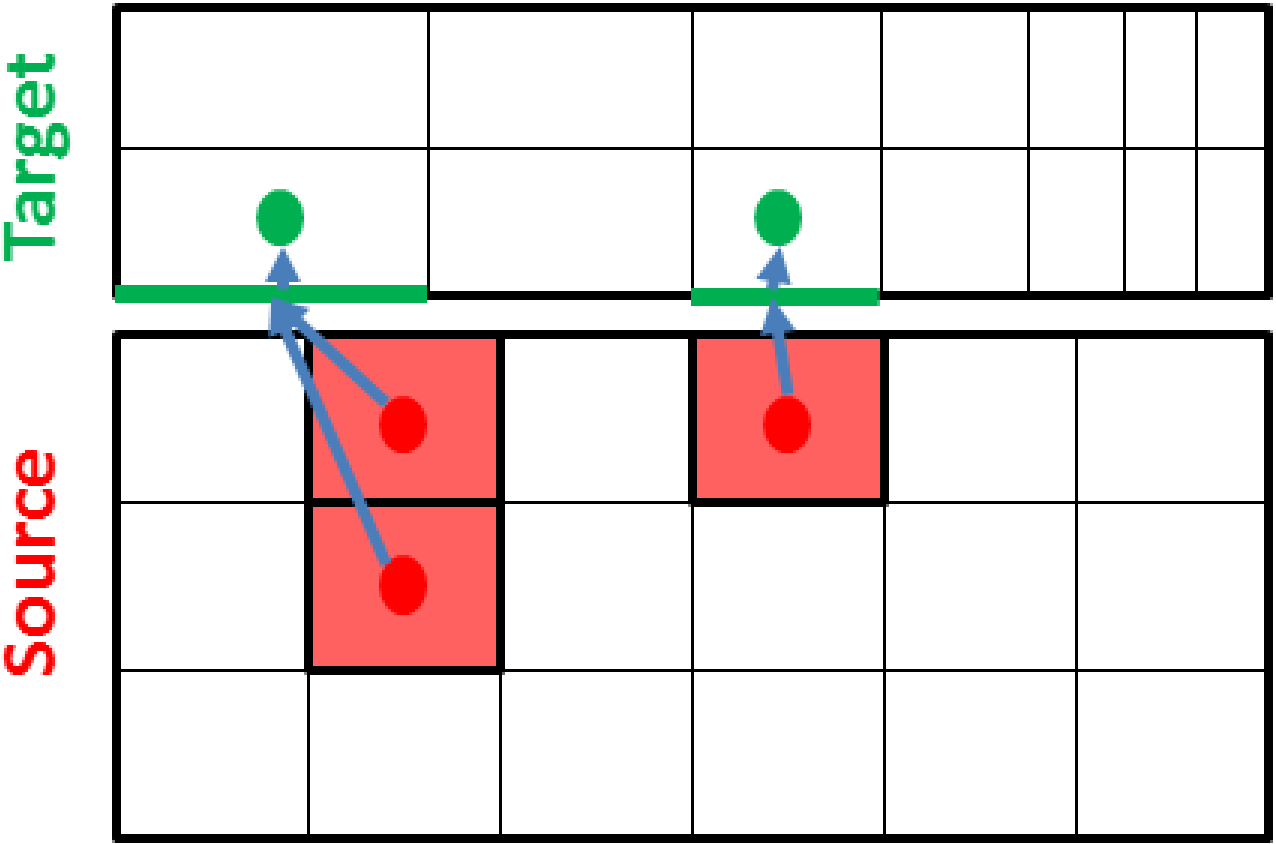 (a) Nearest element.
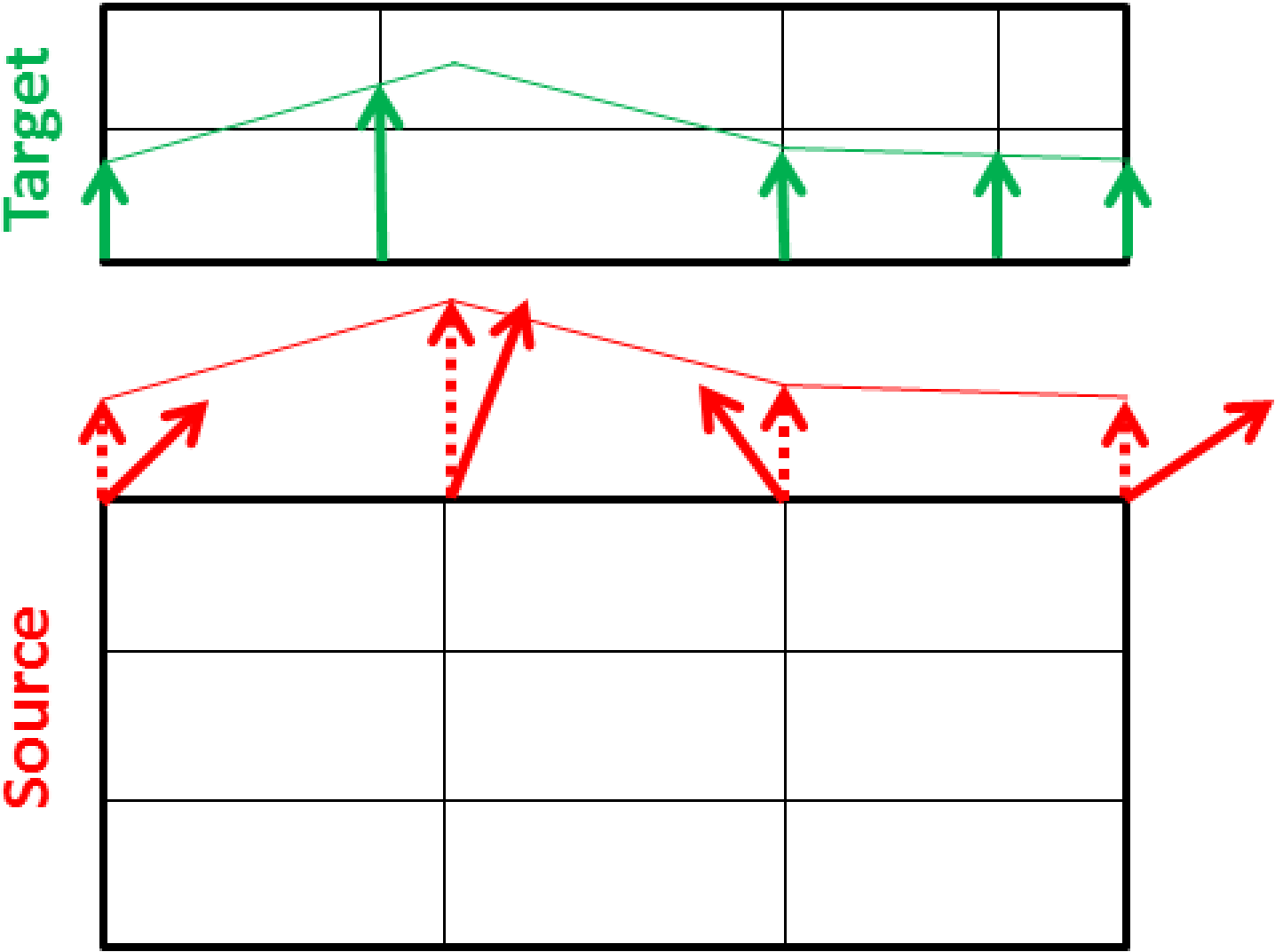 (b) Nearest face.
Fig. 9.16 Variable interpolation options.