4.4.2. Contact
This section discusses how to define a contact boundary between non-contiguously meshed portions of the domain. For a detailed description of the definition of contact and the mathematical basis of the available enforcement models, the reader is referred to the theory section. A comprehensive list of command line options related to contact definitions can be found in the command reference.
Most common cases model contact between surfaces of standard volume elements (2D quadrilateral, 2D triangle, 3D tetrahedron or 3D hexahedron). When considering contact of shell elements with nonconformal interfaces, it is assumed that the shell nodes are coincident with nodes of a standard volume element on one side of the contact under consideration.
Warning
Shell support is limited in nonconformal contact. Specifically, contact along the edge of a shell element is not supported, i.e., a shell element that is perpendicular to another surface does not transmit a flux through the singular axis of the shell.
A contact definition has two main parts, 1) specifying which parts of the mesh are in contact (interactions), and 2) specifying what condition(s) should be applied on the portion of those mesh parts that are in contact (enforcement). An example contact definition is provided below:
# Scope: Sierra > Procedure > Aria Region
Begin Contact Definition surf_to_surf

   # Interaction: Define which entities are in contact, all pairs of contact surfaces will be checked for
   # contact. By default if no specific "Begin Interaction" blocks are present then Aria will check for contact
   # between all contact surfaces. In this example contact will be applied between [surface_3, surface_4],
   # [surface_3, surface_5], and [surface_4, surface_5]
   Contact Surface surf_1 Contains surface_3
   Contact Surface surf_2 Contains surface_4
   Contact Surface surf_3 Contains surface_5

   # Enforcement: How to treat this contact
   Begin Enforcement enf1
     Enforcement for [EQ] = [MODEL] [MODEL ARGS...]
   End

End
4.4.2.1. Interactions
The first step of defining contact interactions is to specify which entities are potentially in contact. In the simplest cases this is done by adding the surfaces of interested to a Contact Surface (as is demonstrated in the first example above). Note that assemblies can be used to simplify the specification of the contacting surfaces.
Alternatively, contacting surfaces can be automatically be found by “skinning” blocks, which automatically creates a surface containing the exterior faces of the blocks, and running contact searches on those surfaces. This can be done either for specific blocks:
# Scope: Sierra > Procedure > Aria Region
begin contact definition mixed_skinning

  #Interaction is a mix of surfaces and skinned blocks
  Contact Surface surf_1 Contains surface_1 block_3 surface_2
  Contact Surface surf_2 Contains surface_3 block_4 surface_5

  Begin Search Options
    # tol can be calculated directly in input
    normal tolerance = {0.1 * lChar}
  End

  begin enforcement enf_1
    Enforcement for Energy = tied_temperature
  end
end
Or for complex geometries with many contacting surfaces that cannot be easily defined/specified, the skin all blocks command can be used to apply contact between the exterior surfaces of every block in the mesh as in this example:
# Scope: Sierra > Procedure > Aria Region
begin contact definition all_to_all

  Begin Search Options
    normal tolerance = 0.01
  End

  # All skinned blocks participate
  skin all blocks = on

  begin enforcement enf_1
    Enforcement for Energy = tied_temperature
  end
end
Finally for more complex subsets of skinned surfaces, one can define a Skinned Surface where the contact is to be defined e.g.
# Scope: Sierra > Procedure > Aria Region
begin skinned surface first_surf
  touching blocks = block_1
  excluding surface = surface_to_ignore
end
begin skinned surface second_surf
  touching blocks = block_2
  excluding surface = surface_to_ignore
end

begin contact definition mixed_skinning

  #Interaction is a mix of surfaces and skinned blocks
  Contact Surface surf_1 Contains first_surf
  Contact Surface surf_2 Contains second_surf

  Begin Search Options
    # tol can be calculated directly in input
    normal tolerance = {0.1 * lChar}
  End

  begin enforcement enf_1
    Enforcement for Energy = tied_temperature
  end
end
In some cases it can be useful to limit the contact to only be between specific pairs of contact surfaces.
This can be accomplished by providing specific Begin Interaction blocks in the contact definition
as in this example:
# Scope: Sierra > Procedure > Aria Region
Begin Contact Definition surf_to_surf

   # Interaction: Define which entities are in contact, all pairs of contact surfaces will be checked for
   # contact.  In this example contact will only be applied between [surface_3, surface_4],
   # and [surface_4, surface_5]
   Contact Surface surf_1 Contains surface_3
   Contact Surface surf_2 Contains surface_4
   Contact Surface surf_3 Contains surface_5

   Begin Interaction s1s2
     surfaces = surf_1 surf_2
   End
   Begin Interaction s2s3
     surfaces = surf_2 surf_3
   End

   # Enforcement: How to treat this contact
   Begin Enforcement enf1
     Enforcement for [EQ] = [MODEL] [MODEL ARGS...]
   End

End
Self contact (a condition where part of a contact surface is in contact with itself) can occur in some cases. Common examples of this include:
Non-convex geometries
Large or complex geometries
Geometries where two volumes are meshed separately and added to the same block
In these cases, it is necessary to activate self contact in the interaction defaults by specifying
begin contact definition assembly_contact
  ...
  begin interaction defaults
    self contact = on
  end
end
4.4.2.2. Search and Contact Tolerance Calculation
The enforcement selected only acts upon surfaces that are determined to be in contact based on geometric proximity. Whether or not surfaces are in contact is determined via a normal tolerance that is either 1) User specified within the search options or interaction blocks of the contact definition (see simulation setup), or 2) set via an automatic tolerancing operation based on the mesh size. This normal tolerance is used on a per-integration-point projection to the closest surface, as shown in Fig. 4.15.
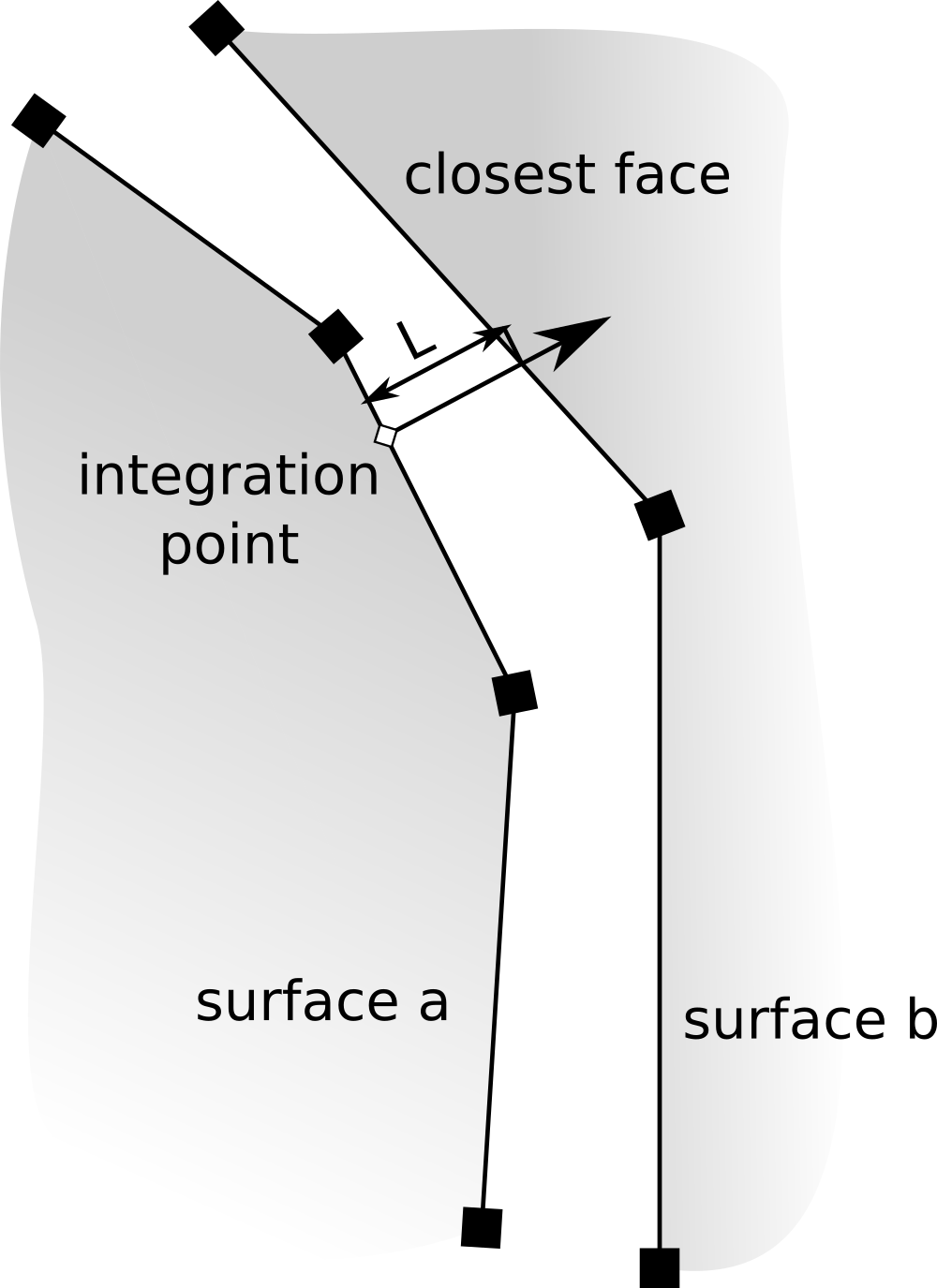
Fig. 4.15 Calculation of contact distance per integration point.
In more detail: For a given surface that may be in contact, the enforcement strategy is expressed
in terms of a surface integral on both surfaces (surface a and surface b in
Fig. 4.15). For evaluating the enforcement kernel on
surface a, the surface facets are iterated, as are the integration points within each facet.
The closest surface is found, as defined by the smallest distance,  , from the integration
point to the surface intersection along the normal direction ( in
Fig. 4.15). If
, from the integration
point to the surface intersection along the normal direction ( in
Fig. 4.15). If  , where
  is
the contact normal tolerance, then that integration point is in contact and the enforcement kernel is evaluated.
If no global or interaction specific contact normal tolerance is specified, the automatically calculated
contact normal tolerance is used, which is calculated as the minimum elemental characteristic length over
all surface elements in a given contact surface. The elemental characteristic length is defined as
the minimum length between any two nodes on the surface element.
is
the contact normal tolerance, then that integration point is in contact and the enforcement kernel is evaluated.
If no global or interaction specific contact normal tolerance is specified, the automatically calculated
contact normal tolerance is used, which is calculated as the minimum elemental characteristic length over
all surface elements in a given contact surface. The elemental characteristic length is defined as
the minimum length between any two nodes on the surface element.
Note
If the smallest distance that might reasonably be observed in the gap is known, it is suggested that this value be expressly stated. This tolerance can be specified either per interaction or for all interactions in search options.
Note that if you want to override the tolerance for a specific interaction, but still have contact between all contact surfaces
you need to set General Contact = on in the interaction defaults block as in this example:
# Scope: Sierra > Procedure > Aria Region
Begin Contact Definition surf_to_surf

   # Interaction: Define which entities are in contact, all pairs of contact surfaces will be checked for
   # contact. In this example contact will be applied between [surface_3, surface_4] and [surface_3, surface_5]
   # using the default mesh-based normal tolerance, while the contact between [surface_4, surface_5] will
   # use the specified normal tolerance of 1.e-3
   Contact Surface surf_1 Contains surface_3
   Contact Surface surf_2 Contains surface_4
   Contact Surface surf_3 Contains surface_5

   Begin Interaction Defaults
     General Contact = on
   End
   Begin Interaction s2s3
     surfaces = surf_2 surf_3
     normal tolerance = 1.e-3
   End

   # Enforcement: How to treat this contact
   Begin Enforcement enf1
     Enforcement for [EQ] = [MODEL] [MODEL ARGS...]
   End
End
4.4.2.3. Dynamic Contact
By default, the contact search is updated only when mesh modification occurs. In problems where the mesh is deforming with time
(e.g. with EQ MESH or coupling to Adagio), it can be necessary to also rerun the search as interfaces move with respect to each other.
This is accomplished by specifying an
update frequency
Update Search Every <N> Steps. This will cause the search to update not only when mesh modification occurs, but ever N time-steps
as well.
4.4.2.4. Enforcement
The full list of contact enforcement models available for each equation in Aria is available in the command reference.
For thermal contact problems there are two primary cases of interest that we discuss here: zero contact resistance across a
mesh interface, and imperfect contact between materials on either side of the interface.
For cases where there is no contact resistance, i.e., the conserved quantity field is contiguous, the team
recommends using the TIED_CONTACT enforcement strategy. For cases with imperfect contact that can be modeled
according to a contact resistance scheme, the team recommends using the GAP_CONDUCTANCE enforcement strategy.
These strategies have the highest pedigree of code testing, verification, and validation. In particular the GAP_CONDUCTANCE
enforcement model is more robust than the CONTACT_RESISTANCE model for large conductance coefficient values. See section
4.3 of [20] for more details.
4.4.2.5. Contact Materials
For some of the Enforcements listed above, material properties must be defined at the interface. The most common example of this is providing the GAP CONDUCTANCE COEFFICIENT for resistance-based enforcement models. These material properties can be defined for a contact interface either in the surface material properties or per-enforcement in the enforcement block. As an example in the latter case
# Scope: Sierra > Procedure > Aria Region
Begin contact definition my_def
  ...
  begin enforcement enf_1
    Enforcement for Energy = contact_resistance

    gap conductance coefficient = constant value = 1e6
  end enforcement
End
Note
If the GAP CONDUCTANCE COEFFICIENT is not defined on a contact surface or its corresponding block material, the value on the opposing surface will be taken.
Warning
If a required contact material property cannot be found, a missing expression error will be thrown.
It is also possible to specify different conductance coefficients per-enforcement. This is done by appending the EQUATIONS to apply a given model to at the end of the material line definition as is demonstrated below
# Scope: Sierra > Procedure > Aria Region
Begin contact definition my_def
  ...
  begin enforcement enf_1
    Enforcement for Energy = contact_resistance
    Enforcement For Current = gap_conductance

    gap conductance coefficient = constant value = 1e6 equations = Current

    contact surface pressure = either_or source=contact_pressure
    gap conductance coefficient = user_function name=gap_cond \$
      x=contact_surface_pressure x_multiplier = -1.0 equations = Energy
  end enforcement
End
The full list of contact material models is available in the command reference.
4.4.2.6. Shell Lofting
Warning
Shell lofting is a work-in-progress and is not thoroughly tested. It is not recommended for production use.
When dealing with shells in contact, the displacement of the shell coordinates for the purposes of contact is based off of the shell lofting factor. The default lofting factor  results in a shell that is “lofted”, i.e., displaced, by the shell thickness in the direction of the shell normal. A lofting factor of 0.5 results in a shell whose midplane is bisected by the defining surface, and a lofting factor of -1 results in a shell surface displaced opposite of the shell normal.
4.4.2.7. Periodic Contact
In problems that are periodic in space, external surfaces may corresponds to periodicity planes. It is often difficult to make the meshes on these surfaces match exactly, such that a periodic BC can be applied. As a more general alternative, the two surfaces can be tied via contact. In this case, periodicity is specified to describe how the two surfaces match up. Periodicity commands will have the general form
Begin Contact Definition contact
  ...

  periodicity for [CONTACT SURFACE] = [MODEL] [model args...]
End
where the CONTACT SURFACE is one defined with a contact surface command. The following MODELs are supported
- ALIGN_SURFACE
This model determines the centroid and average surface normal of the specified
CONTACT SURFACE, and translates/rotates it to align with those of a specified destination surface. If the exact offset is not know, this can be the most convenient model to use. Note that the two surface do not need to have the same topologies.Warning
Care must be taken when this model is used for surfaces whose geometries do not match, or where the average surface normal is zero.
- RECTANGULAR
The specified
CONTACT SURFACEis translated by offset
  before performing contact search.
- CYLINDRICAL
The specified
CONTACT SURFACEis rotated around the given axis and origin before performing contact search.- MAPPED
With this model, points
 on specified surface are mapped via string functions
  before performing contact search.
See the command reference for more details on specifying periodicity.
4.4.2.8. Offset Quantities
In some problems, a specific jump across a contact interface is required. This can occur either between adjacent blocks or in a Periodic Contact setting. In either case, OFFSET material properties can be defined to impose the offset
# Scope: Sierra > Procedure > Aria Region
Begin Contact Definition res1
  Contact Surface surf_1 Contains surface_1
  Contact Surface surf_2 Contains surface_2

  Begin Enforcement enf_1
    Enforcement for Energy = contact_resistance
    gap conductance coefficient = constant value = 5e5
    offset temperature = constant offset = 10.0 surface = surface_2
  End Enforcement enf_1
  ...
End Contact Definition res1
In Periodic Contact, offsets can be used flip vector values in vector enforcements. For example, consider the following mesh deformation problem
           |
           v
     +-----------+
     |     t     |
<--- | l       r | --->
     |     b     |
     +-----------+
The velocity on one side can be reflected so that the body will expand symmetrically
# Scope: Sierra > Procedure > Aria Region
Begin Contact Definition res1
  Contact Surface surf_1 Contains left
  Contact Surface surf_2 Contains right

  periodicity for surf_2 = align_surface destination = surf_1

  Begin Enforcement enf_1
    Enforcement For Mesh = Tied_Mesh_Displacements
    offset mesh velocity = reflected normal = 1.0 0.0 0.0 surface = left
  End Enforcement enf_1
  ...
End Contact Definition res1
...
BC DIRICHLET for Mesh_Displacements_z on top = scalar_string_function f = "-0.1*t"
BC DIRICHLET for Mesh_Displacements_z on bottom = CONSTANT Value = 0
See the command reference for more details on specifying offsets.
Warning
When specifying offset on a surface, one must take care to ensure the problem does not become ill-posed. For example with the geometry demonstrated above, the following contact definition is ill-posed if a constant dirichlet is applied
# Scope: Sierra > Procedure > Aria Region
Begin Contact Definition res1
  Contact Surface surf_1 Contains left
  Contact Surface surf_2 Contains right

  periodicity for surf_2 = align_surface destination = surf_1

  Begin Enforcement enf_1
    Enforcement for Energy = contact_resistance
    gap conductance coefficient = constant value = 5e5
    # temp_offset = {temp_offset = 10.0}
    offset temperature = constant offset = {temp_offset} surface = right
  End Enforcement enf_1
  ...
End Contact Definition res1
...
#BC DIRICHLET for temperature on bottom = constant value = 300 #ill-posed
BC DIRICHLET for temperature on bottom = scalar_string_function \$
  f = "300 + x/{x_len}*{temp_offset}" #good
With a constant dirichlet BC on bottom, the OFFSET_TEMPERATURE cannot change at the shared node and the problem will not converge.
4.4.2.9. Debugging Contact
Begin Contact Definition contact
  ...
  visualize contact
  output rule = summary
End
...
Begin Results Output Label myOutput
  ...
  face variables = thermal_contact_status
End
While setting up a simulation, it can be helpful to receive debugging information about the contact search
performed. This is controlled by specifying the Output Rule command line to the Contact Definition.
Setting this to anything other than NONE will populate the log file with additional information that can be
used in debugging contact. Along with enabling additional output printed to the log, it can be helpful to
visualize where contact has been identified. This is enabled by adding the Visualize Contact command
line to the Contact Definition. This command will populate a field called thermal_contact_status
which can be added to the result database (see Output Reference) and
visualized using e.g. Paraview. Surface facets will be marked by the percentage of their IPs where contact
constraints are applied - 0 meaning no IPs and 1 meaning all IPs.
Warning
Use of this option is primarily for debugging purposes as the Results Output and History file will contain a skinned version of the contact element blocks. This may constitute a large amount of information for discontiguously meshed models.
Warning
Using contact visualization with multiple contact definitions on the same surface can result in duplicating contact contributions. Additionally, toggling each contact definition independently can result in errors in contact visualization.