4.2.3. Skinning
In Aria, skinning refers to the creation of surface parts making up the exposed boundaries of blocks. In most cases, one wishes to collect the existing faces of these blocks and place them in a new Skinned Surface part. In rare cases, one instead wishes to create a Skinned Shell with the same geometry as the exposed boundary. These two options are discussed below.
4.2.3.1. Skinned Surface
The definition of a skinned surface is comprised of 3 main filter types that can be applied to both surfaces and blocks.
touching surfacesDefine the union of surfaces to include in the resulting skinned part. Only faces included in any of the specified surfaces are accepted.
touching blocksDefine the union of blocks’ faces to include in the resulting skinned part. Only faces connected to any of the specified blocks are accepted.
excluding surfacesDefine the union of surfaces to exclude in the resulting skinned part. Faces included in any of the specified surfaces are excluded.
excluding blocksDefine the union of blocks’ faces to exclude in the resulting skinned part. Faces connected to any of the specified blocks are excluded.
intersecting surfacesDefine the intersection of surfaces to include in the resulting skinned part. Only faces included in all of the specified surfaces are included.
intersecting blocksDefine the intersection of blocks’ faces to include in the resulting skinned part. Only faces connected to all of the specified blocks are included.
Note that to ensure the skinned surface definition is self-explanatory, at least one filter line is required. If the entire domain should be skinned, the trivial touching blocks = all_blocks filter can be used.
Note
Assemblies can be used to define the extents of skinned surfaces. These skinned surfaces are created before mesh groups are. This means that mesh groups cannot be used to define skinned surfaces, but skinned surfaces can be added to mesh groups.
The default treatment of internal faces with surface skinning varies with use case. Namely, intersection of parts implies that internal sideset(s) are created, so internal faces are included by default when the intersecting keyword is used. In all other cases, internal faces are excluded by default so that only the exposed boundary of the surface is selected. If one needs to stray from this default behavior, they can expressly state how internal faces are to be treated with the internal faces line.
Examples for some common noteworthy use cases are as follows
- Skin exposed boundary of domain or subset of block(s)
A common use case (e.g. when apply convective/rad BCs) is to skin the relevant blocks and apply the BCs to the resulting part. Note that the default behavior here is to exclude internal faces, so clarifying this is optional. An example syntax for this case is as follows
# Scope: Sierra > Procedure > Aria Region
begin skinned surface skinned_all
  touching blocks = all_blocks
  # internal faces = exclude # default is to exclude
end
begin skinned surface skinned_b1b2
  touching blocks = block_1 block_2
  # internal faces = exclude # default is to exclude
end
The resulting skinned surfaces are demonstrated in Fig. 4.2 for
skinned_allandskinned_b1b2on the left and right respectively.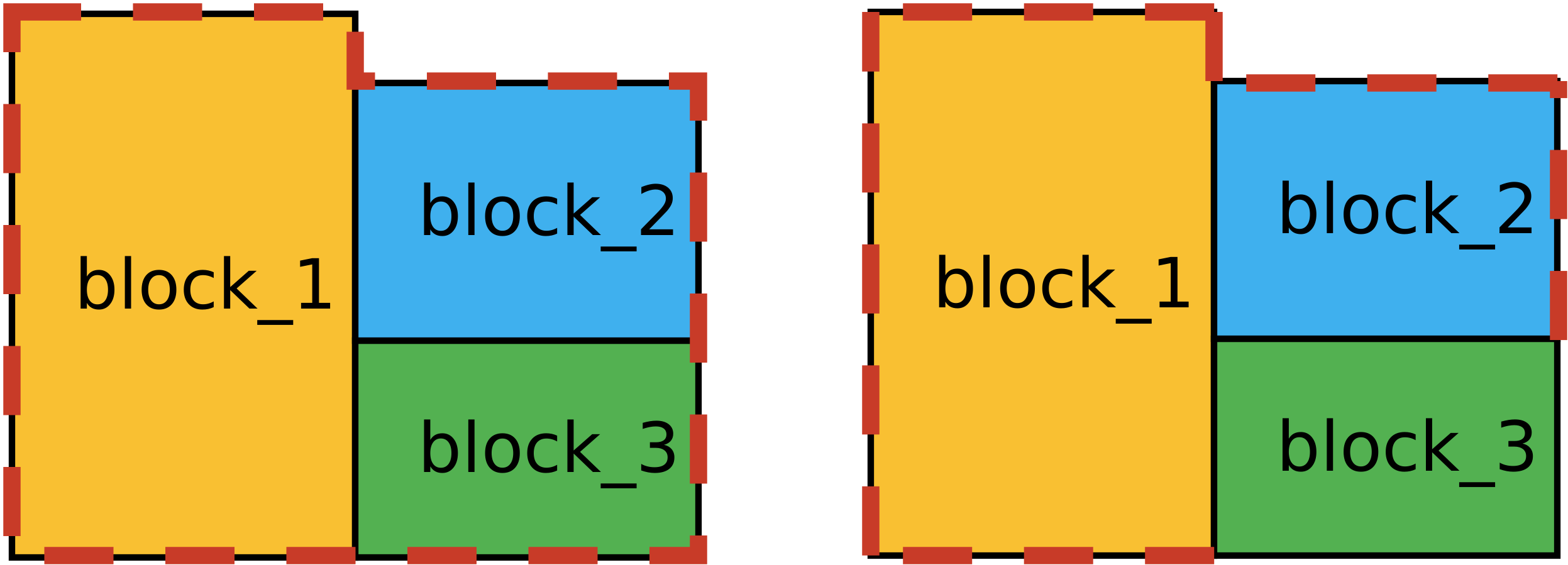
Fig. 4.2 Resulting skinned surface for all blocks in thick dashed red. Left domain shows the results of skinning all blocks, while the right shows the skinning of only
block_1andblock_2.Note that the
exclusionfilter can also be used, meaning that the following would also produce the subset of exposed boundary parts shown in Fig. 4.2# Scope: Sierra > Procedure > Aria Region begin skinned surface skinned_excluding_b3 excluding blocks = block_3 end
- Defining the internal surface at the intersection of blocks
An example of this use case is in defining interface conditions between connected block, or postprocessing at block interfaces. Here we use the
intersectingkeyword to describe the blocks we want to intersect. Note that with the use of the intersecting keyword, the default behavior is to include internal faces so clarifying this is optional.# Scope: Sierra > Procedure > Aria Region begin skinned surface interface_b1b2 intersecting blocks = block_2 block_3 # internal faces = include # default is to include end
The resulting skinned surface is demonstrated in Fig. 4.3 for
interface_b1b2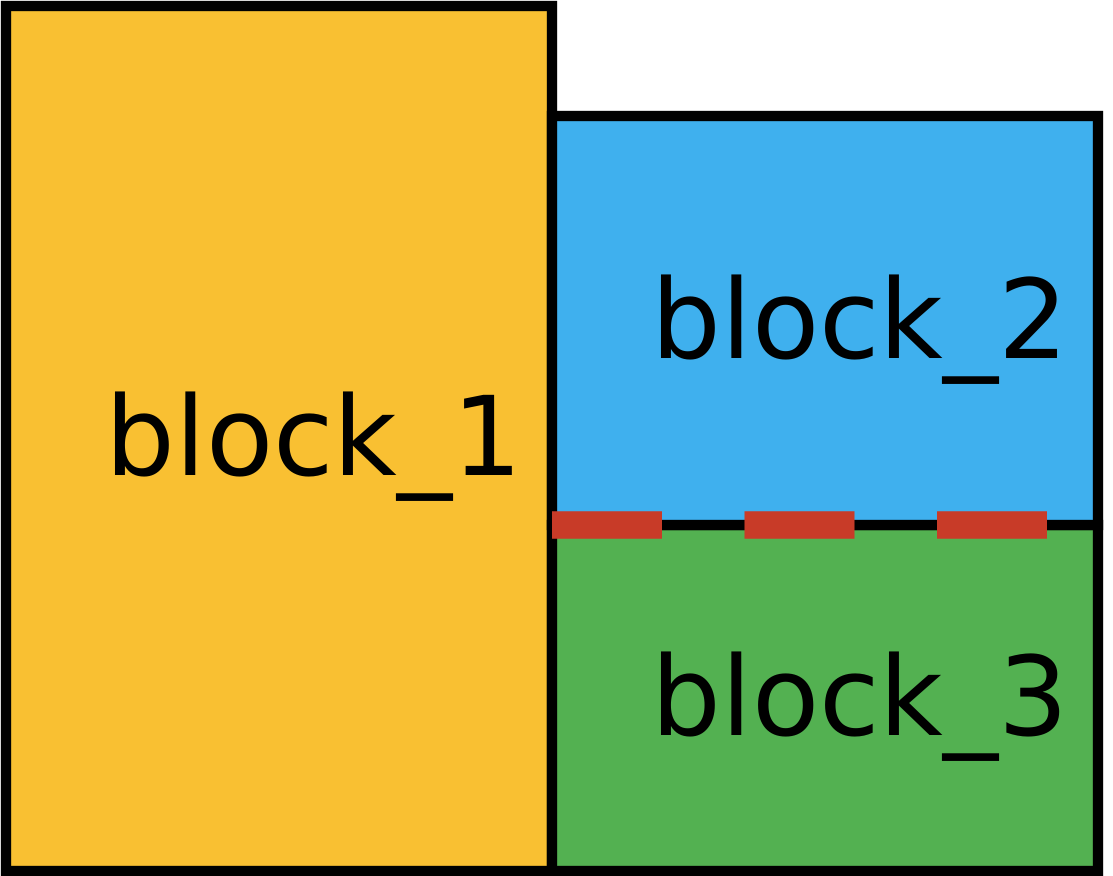
Fig. 4.3 Resulting intersecting skinning surface for
block_2andblock_3in thick dashed red- Skinning block(s) and including internal faces
As discussed above, we do not have an
intersectingline here, so we must manually clarify that internal faces should be included e.g.# Scope: Sierra > Procedure > Aria Region begin skinned surface skinned_int_ext_block_2 touching blocks = block_2 internal faces = include end
The resulting skinned surface is demonstrated in Fig. 4.4 for
skinned_int_ext_block_2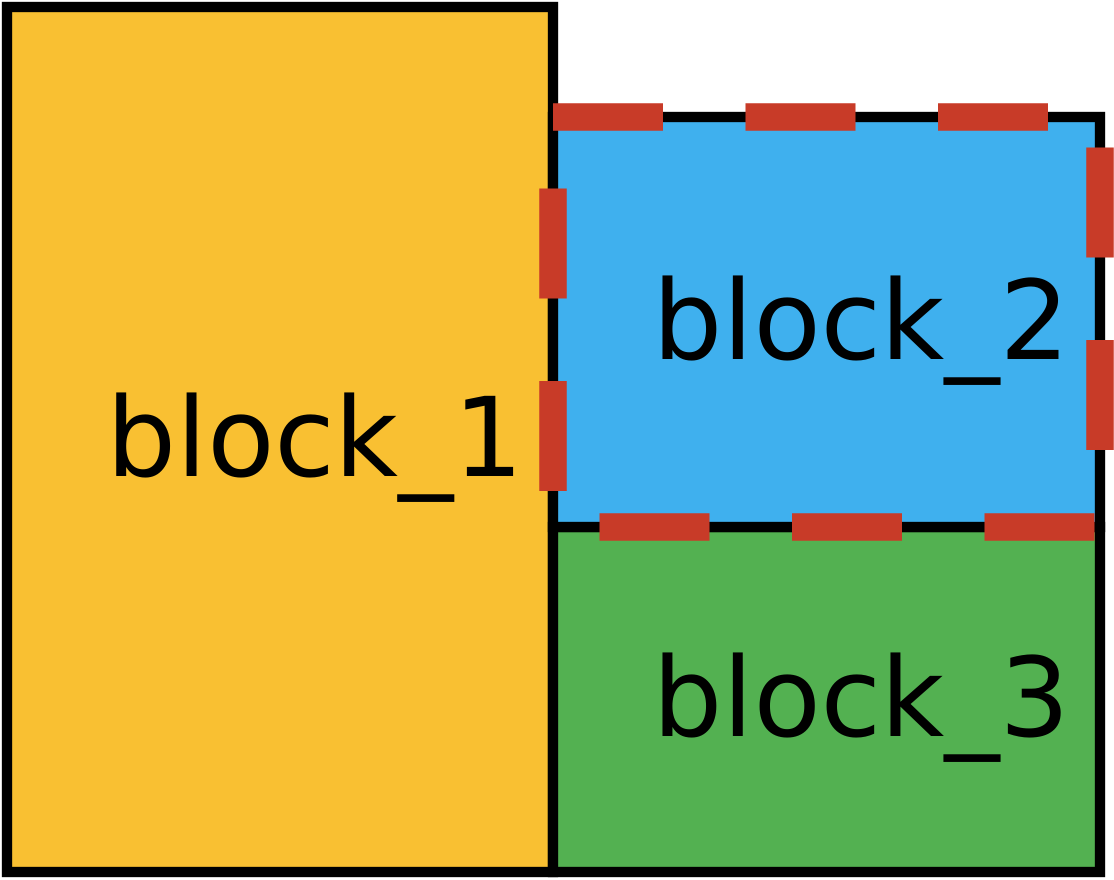
Fig. 4.4 Resulting skinned
block_2including its internal faces in thick dashed red- Nested skinned parts
Skinned surfaces can also be used within skinned surface definitions. This is useful to define more complex surfaces e.g.
# Scope: Sierra > Procedure > Aria Region
Begin Skinned surface to_remove
  intersecting blocks = block_2 block_3
end
Begin Skinned surface skinned_bl_23_ext
  touching blocks = block_2 block_3
  internal faces = include
  excluding surfaces = to_remove
end
creates a skinned surface comprised of the exterior of merging
block_2andblock_3, as is demonstrated in Fig. 4.5 forskinned_bl_23_ext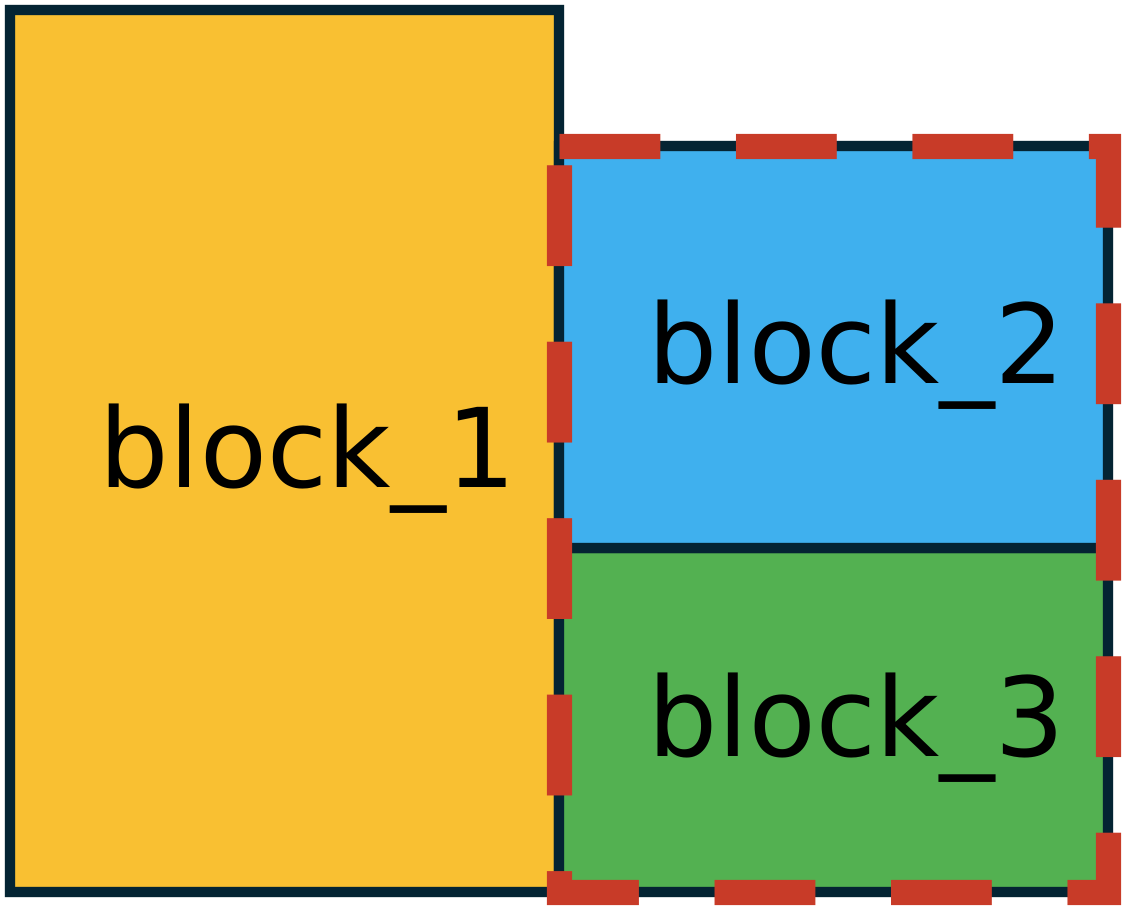
Fig. 4.5 Resulting skinned exterior of
block_2andblock_3with shared faced removedNote
Skinned surfaces are parsed in the order they appear in the input. Ensure that nested surfaces are defined in an appropriate order.
See the command reference for more information on how to specify a skinned surface.
4.2.3.2. Skinned Shell
Beta Capability
The skinned shell capability is under active development and should be used with caution.
Occasionally skinning existing elements is not sufficient, and one may require new elements/nodes to be created. The key difference between this skinned shell block and a Skinned Surface is that the skinned shell block creates new shell elements (and an associated shell surface) with distinct nodes that are collocated with the faces of the specified source surface, rather than creating a surface part comprised of existing element sides.
The touching and excluding syntax is the same as that of the skinned surface. The intersecting functionality is omitted, as internal faces are never included for skinned shell parts. Similar to above, at least one filter must be specified, and the trivial touching blocks = all_blocks filter can be used to skin the entire domain.
Since this creates new shell elements, one must always specify the material to associated with the shell elements (and underling shell surfaces). For example, the following two lines would create skinned shells with the same geometry as Fig. 4.2, with the distinction that the dashed red line would now consistent of distinct shell elements/nodes
# Scope: Sierra > Procedure > Aria Region
begin skinned shell skinned_all
  touching blocks = all_blocks
  use material shell_mat
end
begin skinned shell skinned_b1b2
  touching blocks = block_1 block_2
  use material shell_mat
end
Along with a shell block my_shell, the block begin skinned shell my_shell will also generate an associated surface with _surface appended (e.g. my_shell_surface). This surface is comprised of all exposed surfaces of the shell. See the command reference for more information on how to specify a skinned surface.
4.2.3.2.1. Interpolated Displacement
A common use case of skinned shells is to interpolate a displacement solution so that the shell tracks the skinned surface it was created over. This is especially useful when different components of the field are recessing at different rates, and the skin shell acts as a smooth surface tracking these interfaces to couple over. It is often helpful to specify a Node Merge Tolerance so that the resulting skinned surface is continuous.
Consider the example demonstrated in Fig. 4.6 with coupling_shell in red long dash and contact_surface in blue alternating dash
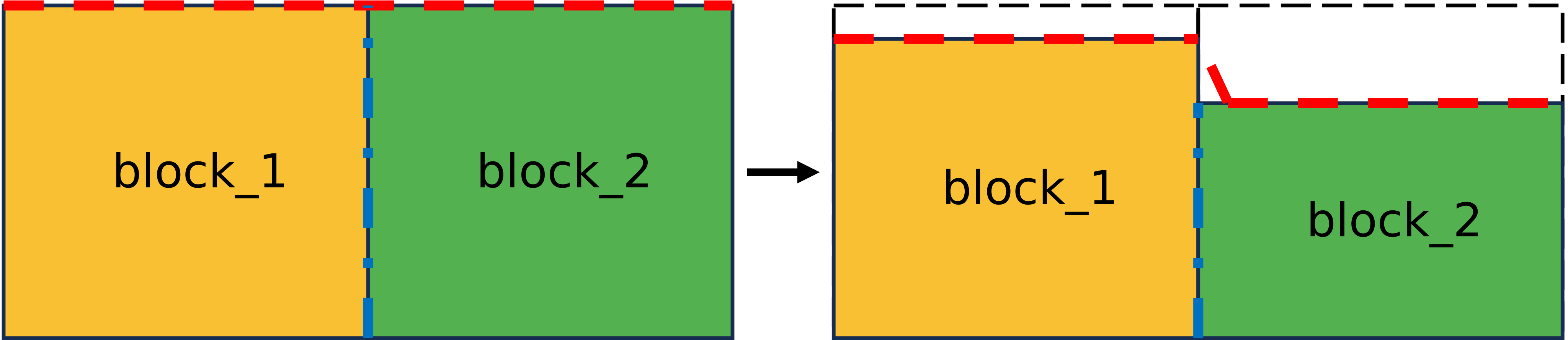
Fig. 4.6 Skinned Shell on top face of blocks with differing recession rates
In this use case, one would first define the skinned shell over the coupling surface(s)
# Scope: Sierra > Procedure > Aria Region
begin skinned shell coupling_shell
  touching surfaces = top_surface
  use material shell_mat

  interpolate mesh displacements from top_surface contact_surface
  node merge tolerance = 0.05
end
Relevant coupling quantities can then be transferred to/from the shell in the same solution control block where the shell’s region is advanced e.g.
# Scope: Sierra > Procedure > Solution Control > System
Begin Transient MySolveBlock
  transfer shell_to_aria
  Advance myRegion
  transfer aria_to_shell
End
Note that these transfers must use physical_coordinates and not the default of model_coordinates, since the interpolation search must be updated as the two bodies deform
Begin transfer aria_to_shell
  interpolate surface nodes from myRegion to myRegion
  Send block top_surface,contact_surface to coupling_shell_surface

  Search Coordinate Field physical_coordinates State none To physical_coordinates State none
  NODES OUTSIDE REGION = TRUNCATE

  Send Field solution->temperature State Old to solution->temperature State Old
  Send Field solution->temperature State new to solution->temperature State new
End
The shell can then be used as the coupling surface in e.g. an Mpmd Coupling.